Number Sequence Groups
- David Tellez
- Jul 7, 2025
- 2 min read

So you've got number sequences nailed down in D365FO. But, what about when your business goes full “multi”? Multiple legal entities, stores, warehouses, billing, or country codes everywhere? Enter Number Sequence Groups—your secret weapon for keeping things neat, predictable, and audit-ready.

The Problem: One Size Doesn’t Fit All
Number sequences are normally set on the parameters, meaning they are company-level. Without groups, you're stuck with one global number sequence. That means:
US POs, UK invoices, CA item journals… all jumbled together. No quick way to tell the origin just by looking at a number. Auditors are asking, “Which site did this come from?”. Finance teams are doing manual cross-checks, and the worst of all, what happens when you need to differentiate your billing with different invoice prefixes and numbers?
Number Sequence Groups bring clarity by letting you assign different sequences for the same document type, based on whatever criteria matter:
Legal entity (US vs. CA vs. EU, Business unit, warehouse, project, etc.), Customer/vendor group, site, department, or even Contracts, if your company is project module-based.

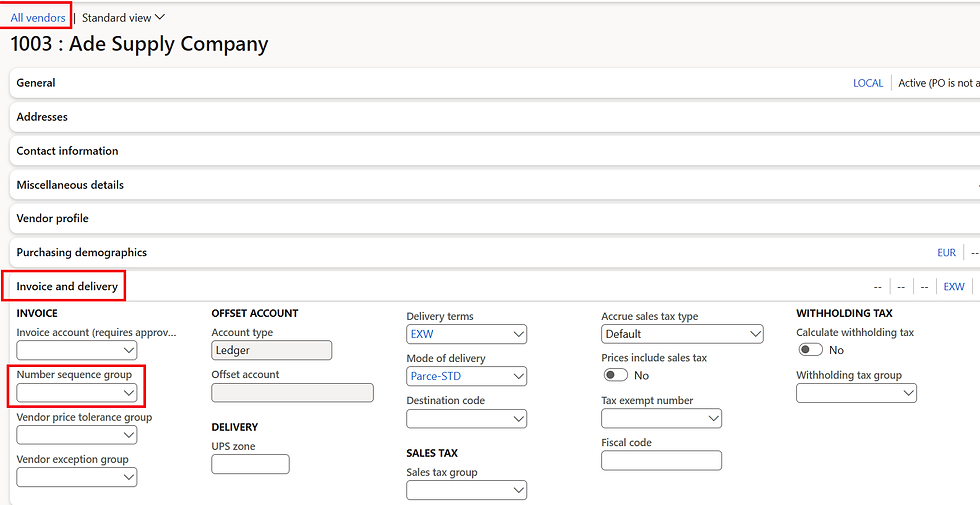
There is no Menu path to create Number Sequence Groups, but you can access them from multiple places. for the case of billing, you can open them from the Customer Master form, the Project Contract form, Free-text invoice, or even from the Sales Oorder Invoice.

There is a bit of manual process in here so you can manage correctly all your number sequences, but this is such a powerful tool in the meantime, you can manage the same document consuming different numbers allowing to control different places, different processes, or even by a third party if it is the case.
Do's and Don'ts
Establish a policy to create NSG, whether it is a store, a country, a group of clients, a warehouse, etc.
Include this step as a mandatory step on third-party creations or transaction creation like PO, SO, warehouse movement, and Billing.
Control from time to time the sequence consumption and make sure they are being used correct way.
Train users, show them how the group logic works and where the assignment happens.
Don’t assign the same reference twice in one group. You'll get validation errors (or worse: silent chaos).
Don’t go overboard with groups: You don’t need 50 of them. Group smart, not hard.
Don’t assume the system will guess: If a group isn’t assigned at the source (like customer group), D365 defaults to the base number sequence—no warning.
Don’t forget to test: Post test documents across all entities/groups before go-live. Trust but verify.
I hope this is helpful and that you've liked!


Comments